Amazon SNS

Amazon Simple Notification Service (Amazon SNS) sends notifications in two ways, A2A and A2P. A2A provides high-throughput, push-based, many-to-many messaging between distributed systems, microservices, and event-driven serverless applications. These applications include Amazon Simple Queue Service (SQS), Amazon Kinesis Data Firehose, AWS Lambda, and other HTTPS endpoints. A2P functionality lets you send messages to your customers with SMS texts, push notifications, and email.
How to work with SNS? Let's make it easy!
Here is a simple example, in which we are going to set an email alert if there are any changes in our EC2 instance.
Step 1: Configure Amazon SNS
Search SNS and select it
Goto
Topicson left barClick on Create topic
Select type
StandardName:
EmailAlertLeave all default and
Create topic
Goto
subscriptionsand select Create subscriptionIn Details Setting
Topic: Select
EmailAlertProtocol: Select
EmailEndpoint:
your-email-address
Create subscription
Now, Open your email, select the AWS Notification email and
select
Confirm subscription
Step 2: Config Amazon EventBridge
(Another form of CloudWatch)
EventBridge is a serverless service that uses events to connect application components together, making it easier for you to build scalable event-driven applications. Use it to route events from sources such as home-grown applications, AWS services, and third-party software to consumer applications across your organization. EventBridge provides a simple and consistent way to ingest, filter, transform, and deliver events so you can build new applications quickly.
Search EventBridge on the search bar and select it, Also click on Buses to expand
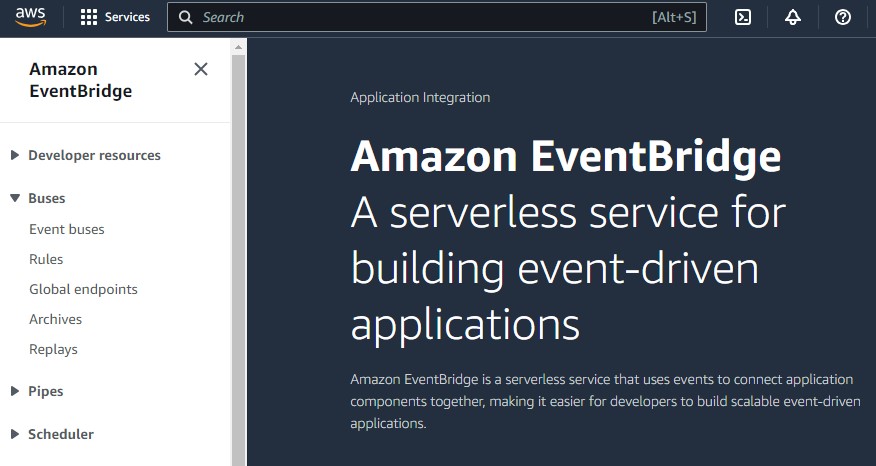
Click on
Rulesthen scroll down and clickCreate ruleConfigure
Step1: Define rule detailas: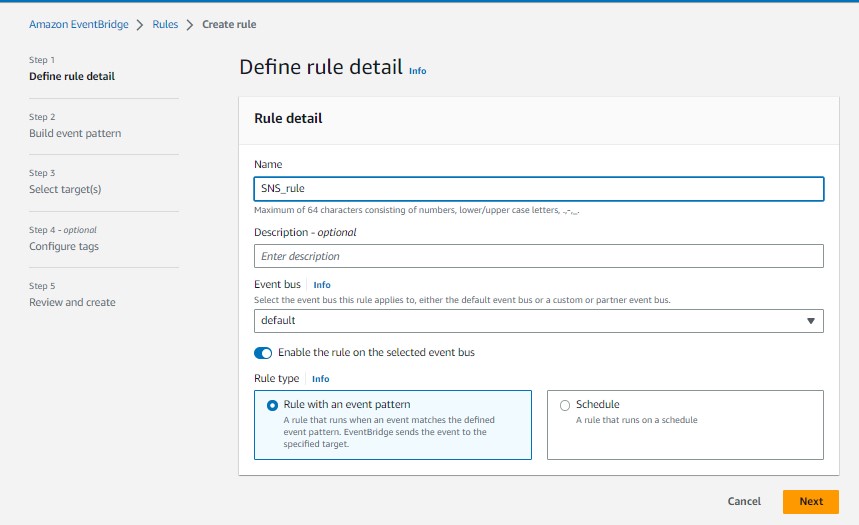
Configure
Step 2: Build event patternas:Leave all defaults and scroll down to
Event pattern
[ Don't panic: Select AWS service then Event type auto-generate ]
Configure
Step 3: Select target(s)as:
Leave optional
Step 4: optional Configure tagsStep 5: Review and createclick on Create rule
Step 3: Working with the EC2 state
In the EC2 instance anything you do with instance i.e. Create, stop, Terminate you will receive an alert email.
For example, let's launch an EC2 instance without any special setup only with the name and existing key leaving all default.
You receive an email like this:

Don't forget to terminate all the things you created !!!
Thanks for Learning the SNS config...
About the author
- "Success is not final; failure is not fatal." I don't care if I fail or succeed; I never give up.
Comments
Join the discussionNo comments yet. Be the first to comment.

